> ## Documentation Index
> Fetch the complete documentation index at: https://docs.nevermined.app/llms.txt
> Use this file to discover all available pages before exploring further.
# Observability & Monitoring
> Learn how to add comprehensive observability and monitoring to your AI agents using Nevermined Payment Libraries
# Observability & Monitoring for AI Agents
The Nevermined Payment Libraries include built-in observability capabilities that allow you to monitor, track, and analyze your AI agent's performance, usage patterns, and costs. This integration provides comprehensive logging and analytics for your AI operations.
## Overview
The observability API provides:
* **Request/Response Logging**: Automatic logging of all AI API calls with full context
* **Usage Tracking**: Token usage, costs, and performance metrics
* **Custom Properties**: Add custom metadata to your logs for better analysis
* **Real-time Monitoring**: View logs and metrics in the Nevermined dashboard
## Basic Integration
### 1. Initialize the Observability API
The observability functionality is automatically available through the `Payments` class:
```typescript theme={null}
import { Payments } from "@nevermined-io/payments";
const payments = Payments.getInstance({
nvmApiKey: "your-api-key",
environment: "sandbox",
});
// Access observability through payments.observability
const observability = payments.observability;
```
```python theme={null}
from payments_py import Payments, PaymentOptions
payments = Payments.get_instance(PaymentOptions(
nvm_api_key="your-api-key",
environment="sandbox",
))
# Access observability through payments.observability
observability = payments.observability
```
### 2. Configure OpenAI with Observability Logging
Use the `withOpenAI` method to wrap your OpenAI client with automatic logging:
```typescript theme={null}
import OpenAI from "openai";
// Create OpenAI client with observability
const openai = new OpenAI(
payments.observability.withOpenAI(
"your-openai-api-key",
agentRequest, // From payment validation
{
userid: "your-user-id", // optional custom property
operation: "financial_advice", // optional custom property
}
)
);
// All OpenAI calls will be automatically logged
const completion = await openai.chat.completions.create({
model: "gpt-4o-mini",
messages: messages,
temperature: 0.3,
max_tokens: 250,
});
```
```python theme={null}
import openai
from dataclasses import asdict
# Set up observability metadata
custom_properties = {
"userid": "your-user-id", # optional custom property
"operation": "financial_advice", # optional custom property
}
# Create OpenAI client with observability
openai_config = payments.observability.with_openai(
"your-openai-api-key",
agent_request, # From payment validation
custom_properties
)
openai_client = openai.OpenAI(**asdict(openai_config))
# All OpenAI calls will be automatically logged
completion = openai_client.chat.completions.create(
model="gpt-4o-mini",
messages=messages,
temperature=0.3,
max_tokens=250,
)
```
### 3. Configure Langchain with Observability Logging
Use the `withLangchain` method to wrap your Langchain client with automatic logging:
```typescript theme={null}
import { ChatOpenAI } from "@langchain/openai";
const llm = new ChatOpenAI(
payments.observability.withLangchain(
"gpt-4o-mini",
"your-openai-api-key",
agentRequest,
{
userid: "your-user-id", // optional custom property
operation: "financial_advice", // optional custom property
}
)
);
```
```python theme={null}
from dataclasses import asdict
from langchain_openai import ChatOpenAI
# Configure Langchain with observability
langchain_config = payments.observability.with_langchain(
"gpt-4o-mini",
"your-openai-api-key",
agent_request,
{
"userid": "your-user-id", # optional custom property
"operation": "financial_advice", # optional custom property
}
)
llm = ChatOpenAI(**asdict(langchain_config))
```
## Advanced Usage
### Manual Operation Logging
Documentation for Manual Operation Logging is coming soon. This section will
cover how to wrap custom operations with observability logging for non-OpenAI
or Langchain services.
### Custom Properties and Metadata
Add custom properties to track additional context:
```typescript theme={null}
const customProperties = {
sessionid: sessionId,
operation: "investment_analysis",
userId: "user-123",
requestType: "portfolio_review",
timestamp: new Date().toISOString(),
};
```
```python theme={null}
custom_properties = {
"sessionid": session_id,
"operation": "investment_analysis",
"userId": "user-123",
"requestType": "portfolio_review",
"timestamp": datetime.now().isoformat(),
}
```
### Usage Calculation Helpers
Documentation for usage calculation helpers for video and audio operations is
coming soon. This section will cover how to calculate usage metrics for
different types of AI operations.
### Pricing Simulation
The pricing simulation feature allows you to test and estimate costs without requiring agent registration, plans, or user subscriptions. This is perfect for development, testing, and cost estimation before going to production.
```typescript theme={null}
// Start a simulation request (no agent/plan needed)
const agentRequest = await payments.requests.startSimulationRequest({
pricePerCredit: 0.01, // Optional: USD per credit (default: 0.01)
batch: false, // Optional: batch mode (default: false)
agentName: "My Test Agent", // Optional: display name
planName: "Test Plan", // Optional: plan name
});
// Make LLM calls with observability
const openai = new OpenAI(
payments.observability.withOpenAI(
process.env.OPENAI_API_KEY!,
agentRequest,
{}
)
);
const completion = await openai.chat.completions.create({
model: "gpt-4o-mini",
messages: [{ role: "user", content: "Hello, world!" }],
});
// Finish simulation with custom margin
await payments.requests.finishSimulationRequest(
agentRequest.agentRequestId,
0.2, // 20% profit margin (default)
false // batch mode
);
```
```python theme={null}
# Start a simulation request (no agent/plan needed)
agent_request = payments.requests.start_simulation_request(
price_per_credit=0.01, # Optional: USD per credit (default: 0.01)
batch=False, # Optional: batch mode (default: False)
agent_name="My Test Agent", # Optional: display name
plan_name="Test Plan", # Optional: plan name
)
# Make LLM calls with observability
openai_config = payments.observability.with_openai(
os.getenv("OPENAI_API_KEY"),
agent_request,
{}
)
openai_client = openai.OpenAI(**asdict(openai_config))
completion = openai_client.chat.completions.create(
model="gpt-4o-mini",
messages=[{"role": "user", "content": "Hello, world!"}],
)
# Finish simulation with custom margin
payments.requests.finish_simulation_request(
agent_request.agent_request_id,
0.2, # 20% profit margin (default)
False # batch mode
)
```
**Key Features:**
* No agent or plan registration required
* No user subscriptions needed
* Automatic cost calculation with configurable profit margins
* Full observability tracking included
* Perfect for testing, development, and cost estimation
**Learn More:** Check out the complete tutorials for full working examples:
* [Pricing Simulation Tutorial (TypeScript)](https://github.com/nevermined-io/tutorials/tree/main/pricing-simulation)
* [Pricing Simulation Tutorial (Python)](https://github.com/nevermined-io/tutorials/tree/main/pricing-simulation-py)
### Batch vs Regular Requests
You can process requests in two modes:
* **Regular Requests**: Process one request at a time. Each request gets its own unique agent request ID.
* **Batch Requests**: Process multiple requests together using the same agent request ID. This is useful when you need to make multiple AI calls (e.g., multiple OpenAI requests) within a single user request, and you want to redeem credits once at the end for all operations combined.
```typescript theme={null}
// Regular request - process one request at a time
const agentRequest = await payments.requests.startProcessingRequest(
agentId,
authHeader,
requestedUrl,
httpVerb
);
// Batch request - process multiple requests together
const agentRequest = await payments.requests.startProcessingBatchRequest(
agentId,
authHeader,
requestedUrl,
httpVerb
);
```
```python theme={null}
# Regular request - process one request at a time
agent_request = payments.requests.start_processing_request(
agent_id,
auth_header,
requested_url,
http_verb
)
# Batch request - process multiple requests together
agent_request = payments.requests.start_processing_batch_request(
agent_id,
auth_header,
requested_url,
http_verb
)
```
### Credit Redemption Strategies
There are two ways to redeem credits after processing a request:
**Important:** The redemption method you use must match how you started the request:
* If you used `startProcessingRequest()`, use `redeemCreditsFromRequest()` or `redeemWithMarginFromRequest()`
* If you used `startProcessingBatchRequest()`, use `redeemCreditsFromBatchRequest()` or `redeemWithMarginFromBatchRequest()`
#### Fixed Credit Redemption
Charges a specific number of credits per request. Useful for predictable, pay-per-use models.
The credit amount can be a static value or calculated dynamically (e.g., based on token usage, API calls made, or other metrics).
```typescript theme={null}
// Credit amount can be static or dynamically computed
const creditAmount = BigInt(10); // Static value
// OR
const creditAmount = calculateCreditAmount(tokensUsed, maxTokens); // Computed value
// Redeem fixed credits from a regular request
const redemptionResult = await payments.requests.redeemCreditsFromRequest(
agentRequestId,
requestAccessToken,
creditAmount
);
// Redeem fixed credits from a batch request
const redemptionResult = await payments.requests.redeemCreditsFromBatchRequest(
agentRequestId,
requestAccessToken,
creditAmount
);
// Extract credits redeemed
const creditsRedeemed = redemptionResult.data?.amountOfCredits || 0;
```
```python theme={null}
# Credit amount can be static or dynamically computed
credit_amount = 10 # Static value
# OR
credit_amount = calculate_credit_amount(tokens_used, max_tokens) # Computed value
# Redeem fixed credits from a regular request
redemption_response = payments.requests.redeem_credits_from_request(
agent_request_id,
request_access_token,
credit_amount
)
# Redeem fixed credits from a batch request
redemption_response = payments.requests.redeem_credits_from_batch_request(
agent_request_id,
request_access_token,
credit_amount
)
# Extract credits redeemed
credits_redeemed = redemption_response.get("data", {}).get("amountOfCredits", 0)
```
#### Margin-based Redemption
Charges the actual API cost plus a margin percentage. Useful for adding a service fee on top of API costs.
The margin percentage can be a static value or calculated dynamically (e.g., based on business logic, user tier, or market conditions).
For example, if an API call costs 10 cents and you set a 20% margin (0.2), the total charge will be 10 + (10 × 0.2) = 12 cents in dollar-equivalent credits.
```typescript theme={null}
// Margin percentage can be static or dynamically computed
const marginPercent = 0.2; // Static 20% margin
// OR
const marginPercent = calculateMargin(userTier, apiCost); // Computed value
// Redeem with margin from a regular request
const redemptionResult = await payments.requests.redeemWithMarginFromRequest(
agentRequestId,
requestAccessToken,
marginPercent
);
// Redeem with margin from a batch request
const redemptionResult = await payments.requests.redeemWithMarginFromBatchRequest(
agentRequestId,
requestAccessToken,
marginPercent
);
// Extract credits redeemed
const creditsRedeemed = redemptionResult.data?.amountOfCredits || 0;
```
```python theme={null}
# Margin percentage can be static or dynamically computed
margin_percent = 0.2 # Static 20% margin
# OR
margin_percent = calculate_margin(user_tier, api_cost) # Computed value
# Redeem with margin from a regular request
redemption_response = payments.requests.redeem_with_margin_from_request(
agent_request_id,
request_access_token,
margin_percent
)
# Redeem with margin from a batch request
redemption_response = payments.requests.redeem_with_margin_from_batch_request(
agent_request_id,
request_access_token,
margin_percent
)
# Extract credits redeemed
credits_redeemed = redemption_response.get("data", {}).get("amountOfCredits", 0)
```
## Complete Example
Here's a complete example showing how to integrate observability into an AI agent:
```typescript theme={null}
import express from "express";
import OpenAI from "openai";
import { Payments } from "@nevermined-io/payments";
const app = express();
app.use(express.json());
const payments = Payments.getInstance({
nvmApiKey: process.env.NVM_API_KEY!,
environment: "sandbox",
});
app.post("/ask", async (req, res) => {
try {
// Validate payment and get agent request
const agentRequest = await payments.requests.startProcessingRequest(
process.env.AGENT_ID!,
req.headers.authorization as string,
req.url,
req.method
);
// Check user has sufficient balance
if (
!agentRequest.balance.isSubscriber ||
agentRequest.balance.balance < 1n
) {
return res.status(402).json({ error: "Payment Required" });
}
const { input_query, sessionId, userId } = req.body;
// Set up observability metadata
const customProperties = {
sessionid: sessionId,
operation: "financial_advice",
userid: userId,
};
// Create OpenAI client with observability
const openai = new OpenAI(
payments.observability.withOpenAI(
process.env.OPENAI_API_KEY!,
agentRequest,
customProperties
)
);
// Make the AI call (automatically logged)
const completion = await openai.chat.completions.create({
model: "gpt-4o-mini",
messages: [
{ role: "system", content: "You are a financial advisor..." },
{ role: "user", content: input_query },
],
temperature: 0.3,
max_tokens: 250,
});
const response = completion.choices[0]?.message?.content;
// Redeem credits
await payments.requests.redeemCreditsFromRequest(
agentRequest.agentRequestId,
req.headers.authorization?.replace("Bearer ", "")!,
BigInt(10) // Credit amount
);
res.json({
output: response,
sessionId: customProperties.sessionid,
tokensUsed: completion.usage?.total_tokens,
});
} catch (error) {
console.error("Error:", error);
res.status(500).json({ error: "Internal server error" });
}
});
```
```python theme={null}
import os
from dataclasses import asdict
from fastapi import FastAPI, HTTPException, Header
from pydantic import BaseModel
from typing import Optional
import openai
from payments_py import Payments, PaymentOptions
app = FastAPI()
payments = Payments.get_instance(PaymentOptions(
nvm_api_key=os.getenv("NVM_API_KEY"),
environment="sandbox",
))
class AskRequest(BaseModel):
input_query: str
sessionId: Optional[str] = None
userId: Optional[str] = None
@app.post("/ask")
async def ask(
request: AskRequest,
authorization: Optional[str] = Header(default=None)
):
try:
# Validate Bearer token format
if not authorization or not authorization.startswith("Bearer "):
raise HTTPException(
status_code=401,
detail="Authorization header must be in format: Bearer "
)
# Validate payment and get agent request
agent_request = payments.requests.start_processing_request(
os.getenv("AGENT_ID"),
authorization,
"/ask",
"POST"
)
# Check user has sufficient balance
if not agent_request.balance.is_subscriber or agent_request.balance.balance < 1:
raise HTTPException(status_code=402, detail="Payment Required")
# Extract access token for credit redemption
request_access_token = authorization.replace("Bearer ", "", 1)
# Set up observability metadata
custom_properties = {
"sessionid": request.sessionId,
"operation": "financial_advice",
"userid": request.userId,
}
# Create OpenAI client with observability
openai_config = payments.observability.with_openai(
os.getenv("OPENAI_API_KEY"),
agent_request,
custom_properties
)
openai_client = openai.OpenAI(**asdict(openai_config))
# Make the AI call (automatically logged)
completion = openai_client.chat.completions.create(
model="gpt-4o-mini",
messages=[
{"role": "system", "content": "You are a financial advisor..."},
{"role": "user", "content": request.input_query},
],
temperature=0.3,
max_tokens=250,
)
response = completion.choices[0].message.content
tokens_used = completion.usage.completion_tokens if completion.usage else 0
# Redeem credits
payments.requests.redeem_credits_from_request(
agent_request.agent_request_id,
request_access_token,
10 # Credit amount
)
return {
"output": response,
"sessionId": custom_properties["sessionid"],
"tokensUsed": tokens_used,
}
except HTTPException:
raise
except Exception as error:
print(f"Error: {error}")
raise HTTPException(status_code=500, detail="Internal server error")
```
### Additional Examples
Complete example using batch request processing. This example shows making multiple AI calls within a single batch request, all sharing the same agent request ID:
```typescript theme={null}
// Use batch processing - all operations will share the same agent request ID
const agentRequest = await payments.requests.startProcessingBatchRequest(
process.env.AGENT_ID!,
req.headers.authorization as string,
req.url,
req.method
);
// Check user has sufficient balance
if (!agentRequest.balance.isSubscriber || agentRequest.balance.balance < 1n) {
return res.status(402).json({ error: "Payment Required" });
}
const requestAccessToken = req.headers.authorization?.replace("Bearer ", "")!;
// Create OpenAI client with observability
const openai = new OpenAI(
payments.observability.withOpenAI(
process.env.OPENAI_API_KEY!,
agentRequest,
{ operation: "batch_analysis" }
)
);
// Make multiple AI calls in the same batch
// Call 1: Analyze user query
const analysis = await openai.chat.completions.create({
model: "gpt-4o-mini",
messages: [{ role: "user", content: "Analyze this investment strategy..." }],
max_tokens: 100,
});
// Call 2: Generate recommendations
const recommendations = await openai.chat.completions.create({
model: "gpt-4o-mini",
messages: [{ role: "user", content: "Provide investment recommendations..." }],
max_tokens: 100,
});
// Call 3: Create summary
const summary = await openai.chat.completions.create({
model: "gpt-4o-mini",
messages: [{ role: "user", content: "Summarize the analysis..." }],
max_tokens: 50,
});
// Calculate total credits for all operations
const totalCredits = BigInt(30); // Or calculate based on actual token usage
// Redeem credits once for all operations in the batch
await payments.requests.redeemCreditsFromBatchRequest(
agentRequest.agentRequestId,
requestAccessToken,
totalCredits
);
res.json({
analysis: analysis.choices[0]?.message?.content,
recommendations: recommendations.choices[0]?.message?.content,
summary: summary.choices[0]?.message?.content,
});
```
```python theme={null}
# Use batch processing - all operations will share the same agent request ID
agent_request = payments.requests.start_processing_batch_request(
os.getenv("AGENT_ID"),
authorization,
"/ask",
"POST"
)
# Check user has sufficient balance
if not agent_request.balance.is_subscriber or agent_request.balance.balance < 1:
raise HTTPException(status_code=402, detail="Payment Required")
request_access_token = authorization.replace("Bearer ", "", 1)
# Create OpenAI client with observability
openai_config = payments.observability.with_openai(
os.getenv("OPENAI_API_KEY"),
agent_request,
{"operation": "batch_analysis"}
)
openai_client = openai.OpenAI(**asdict(openai_config))
# Make multiple AI calls in the same batch
# Call 1: Analyze user query
analysis = openai_client.chat.completions.create(
model="gpt-4o-mini",
messages=[{"role": "user", "content": "Analyze this investment strategy..."}],
max_tokens=100,
)
# Call 2: Generate recommendations
recommendations = openai_client.chat.completions.create(
model="gpt-4o-mini",
messages=[{"role": "user", "content": "Provide investment recommendations..."}],
max_tokens=100,
)
# Call 3: Create summary
summary = openai_client.chat.completions.create(
model="gpt-4o-mini",
messages=[{"role": "user", "content": "Summarize the analysis..."}],
max_tokens=50,
)
# Calculate total credits for all operations
total_credits = 30 # Or calculate based on actual token usage
# Redeem credits once for all operations in the batch
payments.requests.redeem_credits_from_batch_request(
agent_request.agent_request_id,
request_access_token,
total_credits
)
return {
"analysis": analysis.choices[0].message.content,
"recommendations": recommendations.choices[0].message.content,
"summary": summary.choices[0].message.content,
}
```
Complete example using margin-based credit redemption:
```typescript theme={null}
// Regular request processing
const agentRequest = await payments.requests.startProcessingRequest(
process.env.AGENT_ID!,
req.headers.authorization as string,
req.url,
req.method
);
// ... rest of your agent logic ...
// Redeem with margin percentage (e.g., 20% markup on API costs)
const marginPercent = 0.2;
await payments.requests.redeemWithMarginFromRequest(
agentRequest.agentRequestId,
requestAccessToken,
marginPercent
);
```
```python theme={null}
# Regular request processing
agent_request = payments.requests.start_processing_request(
os.getenv("AGENT_ID"),
authorization,
"/ask",
"POST"
)
# ... rest of your agent logic ...
# Redeem with margin percentage (e.g., 20% markup on API costs)
margin_percent = 0.2
payments.requests.redeem_with_margin_from_request(
agent_request.get("agent_request_id"),
request_access_token,
margin_percent
)
```
Complete example combining batch processing with margin-based pricing. All operations share the same agent request ID, and credits are redeemed once at the end based on actual API costs plus margin:
```typescript theme={null}
// Use batch processing - all operations will share the same agent request ID
const agentRequest = await payments.requests.startProcessingBatchRequest(
process.env.AGENT_ID!,
req.headers.authorization as string,
req.url,
req.method
);
// Check user has sufficient balance
if (!agentRequest.balance.isSubscriber || agentRequest.balance.balance < 1n) {
return res.status(402).json({ error: "Payment Required" });
}
const requestAccessToken = req.headers.authorization?.replace("Bearer ", "")!;
// Create OpenAI client with observability
const openai = new OpenAI(
payments.observability.withOpenAI(
process.env.OPENAI_API_KEY!,
agentRequest,
{ operation: "batch_analysis" }
)
);
// Make multiple AI calls in the same batch
// Call 1: Analyze user query
const analysis = await openai.chat.completions.create({
model: "gpt-4o-mini",
messages: [{ role: "user", content: "Analyze this investment strategy..." }],
max_tokens: 100,
});
// Call 2: Generate recommendations
const recommendations = await openai.chat.completions.create({
model: "gpt-4o-mini",
messages: [{ role: "user", content: "Provide investment recommendations..." }],
max_tokens: 100,
});
// Call 3: Create summary
const summary = await openai.chat.completions.create({
model: "gpt-4o-mini",
messages: [{ role: "user", content: "Summarize the analysis..." }],
max_tokens: 50,
});
// Redeem with margin using batch method
// The margin is applied to the total API cost of all three calls
const marginPercent = 0.2; // 20% markup on total API costs
await payments.requests.redeemWithMarginFromBatchRequest(
agentRequest.agentRequestId,
requestAccessToken,
marginPercent
);
res.json({
analysis: analysis.choices[0]?.message?.content,
recommendations: recommendations.choices[0]?.message?.content,
summary: summary.choices[0]?.message?.content,
});
```
```python theme={null}
# Use batch processing - all operations will share the same agent request ID
agent_request = payments.requests.start_processing_batch_request(
os.getenv("AGENT_ID"),
authorization,
"/ask",
"POST"
)
# Check user has sufficient balance
if not agent_request.balance.is_subscriber or agent_request.balance.balance < 1:
raise HTTPException(status_code=402, detail="Payment Required")
request_access_token = authorization.replace("Bearer ", "", 1)
# Create OpenAI client with observability
openai_config = payments.observability.with_openai(
os.getenv("OPENAI_API_KEY"),
agent_request,
{"operation": "batch_analysis"}
)
openai_client = openai.OpenAI(**asdict(openai_config))
# Make multiple AI calls in the same batch
# Call 1: Analyze user query
analysis = openai_client.chat.completions.create(
model="gpt-4o-mini",
messages=[{"role": "user", "content": "Analyze this investment strategy..."}],
max_tokens=100,
)
# Call 2: Generate recommendations
recommendations = openai_client.chat.completions.create(
model="gpt-4o-mini",
messages=[{"role": "user", "content": "Provide investment recommendations..."}],
max_tokens=100,
)
# Call 3: Create summary
summary = openai_client.chat.completions.create(
model="gpt-4o-mini",
messages=[{"role": "user", "content": "Summarize the analysis..."}],
max_tokens=50,
)
# Redeem with margin using batch method
# The margin is applied to the total API cost of all three calls
margin_percent = 0.2 # 20% markup on total API costs
payments.requests.redeem_with_margin_from_batch_request(
agent_request.agent_request_id,
request_access_token,
margin_percent
)
return {
"analysis": analysis.choices[0].message.content,
"recommendations": recommendations.choices[0].message.content,
"summary": summary.choices[0].message.content,
}
```
## Monitoring and Analytics
### Events Log Table
The frontend provides a comprehensive events log table showing:
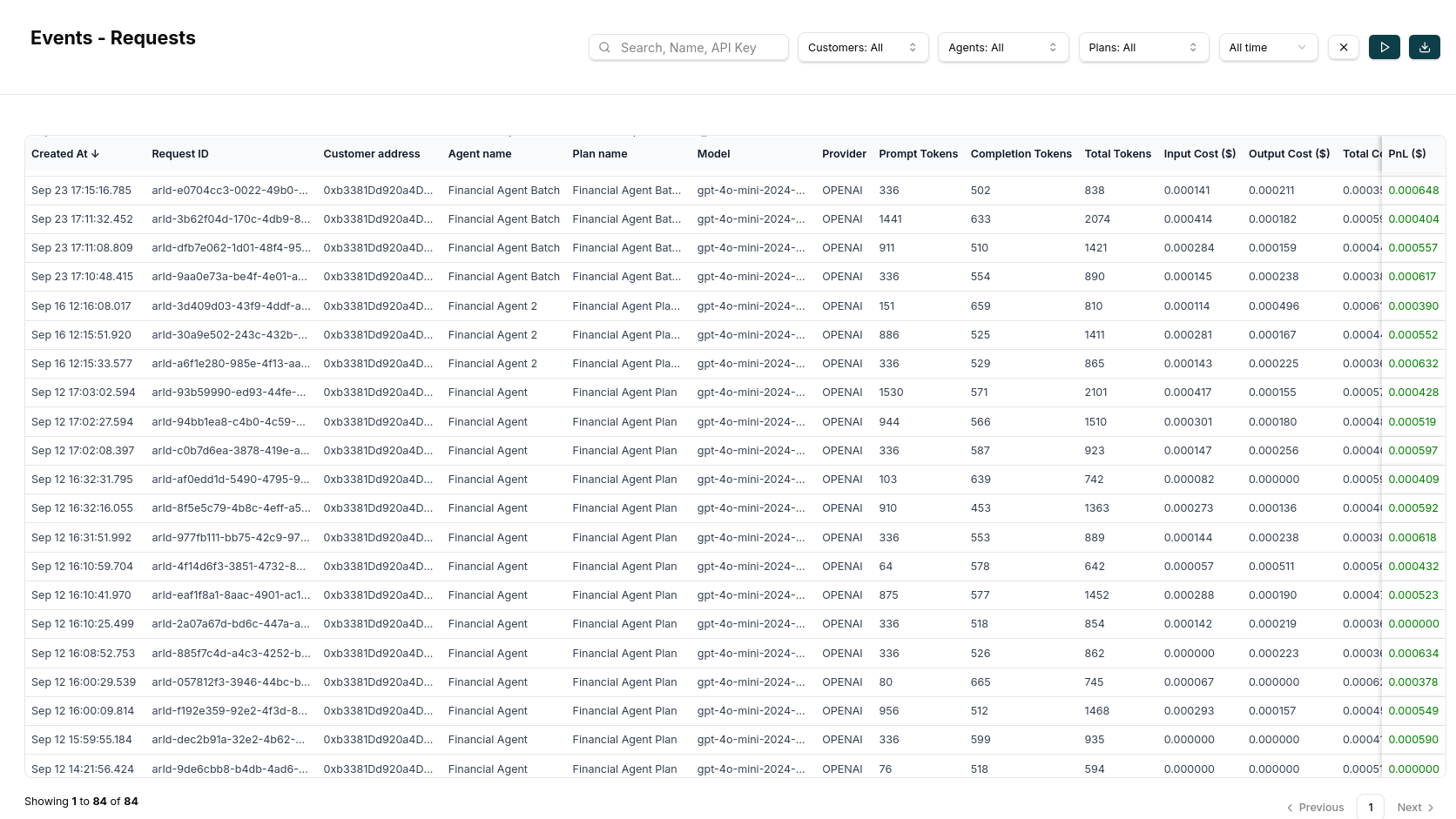 *Screenshot of the events log table showing detailed request information, timestamps, costs, and status*
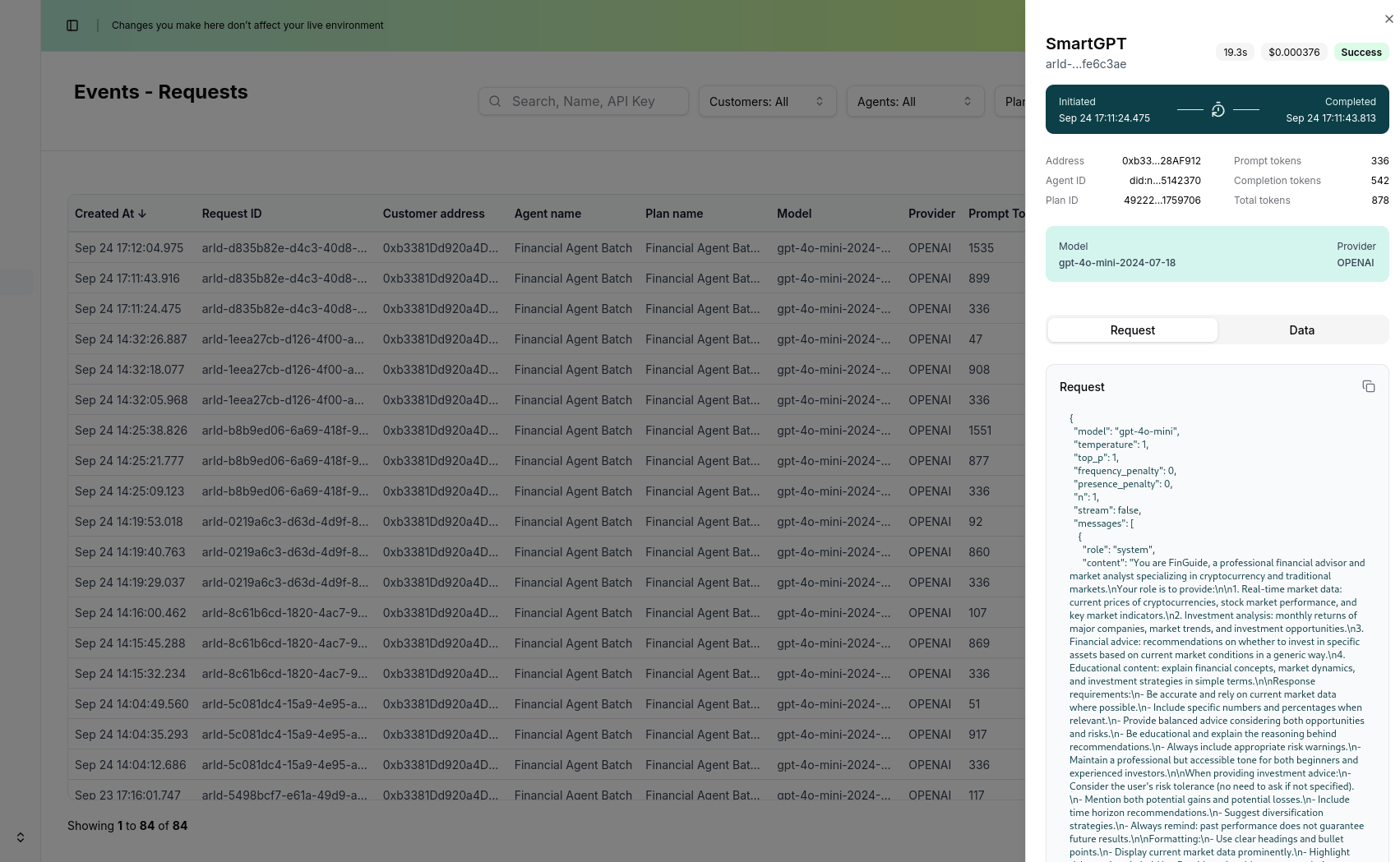 *Screenshot of the events log table showing details of a specific request*
#### Key Metrics Tracked
The observability integration automatically tracks:
* **Timestamp**: When each request was made
* **User**: Account address and session information
* **Agent**: Agent name and operation type
* **Request**: Input query and context
* **Response**: AI-generated response
* **Cost Analysis**: Credit consumption and cost per request
* **Status**: Success/failure status
* **Performance Metrics**: Response times, success rates, error rates, token usage, and more
### Data Analytics Dashboard
Once your agent is running with observability enabled, you can view detailed data analytics in the Nevermined dashboard:
*Screenshot of the events log table showing details of a specific request*
#### Key Metrics Tracked
The observability integration automatically tracks:
* **Timestamp**: When each request was made
* **User**: Account address and session information
* **Agent**: Agent name and operation type
* **Request**: Input query and context
* **Response**: AI-generated response
* **Cost Analysis**: Credit consumption and cost per request
* **Status**: Success/failure status
* **Performance Metrics**: Response times, success rates, error rates, token usage, and more
### Data Analytics Dashboard
Once your agent is running with observability enabled, you can view detailed data analytics in the Nevermined dashboard:
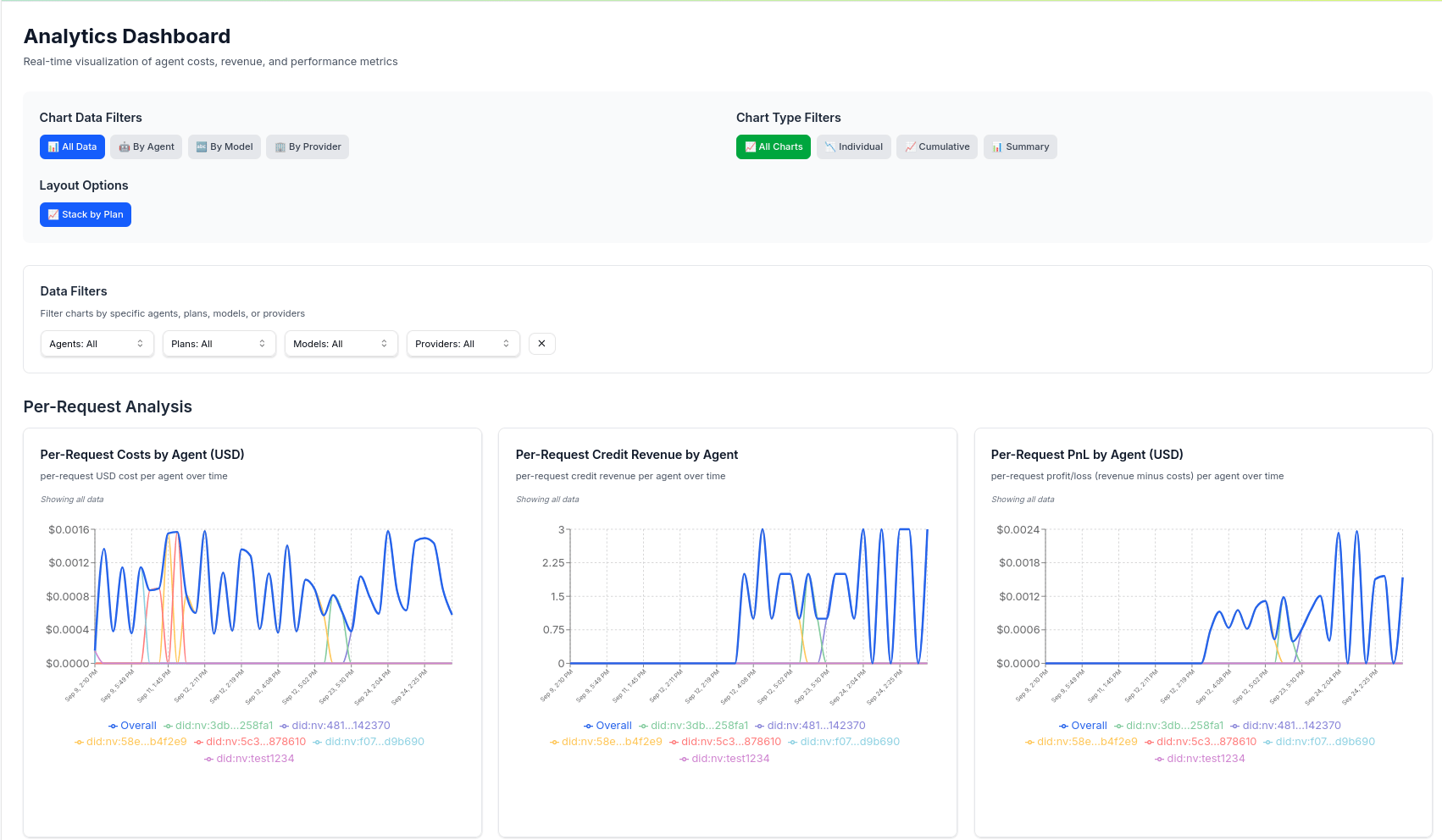 *Screenshot showing the Nevermined analytics dashboard*
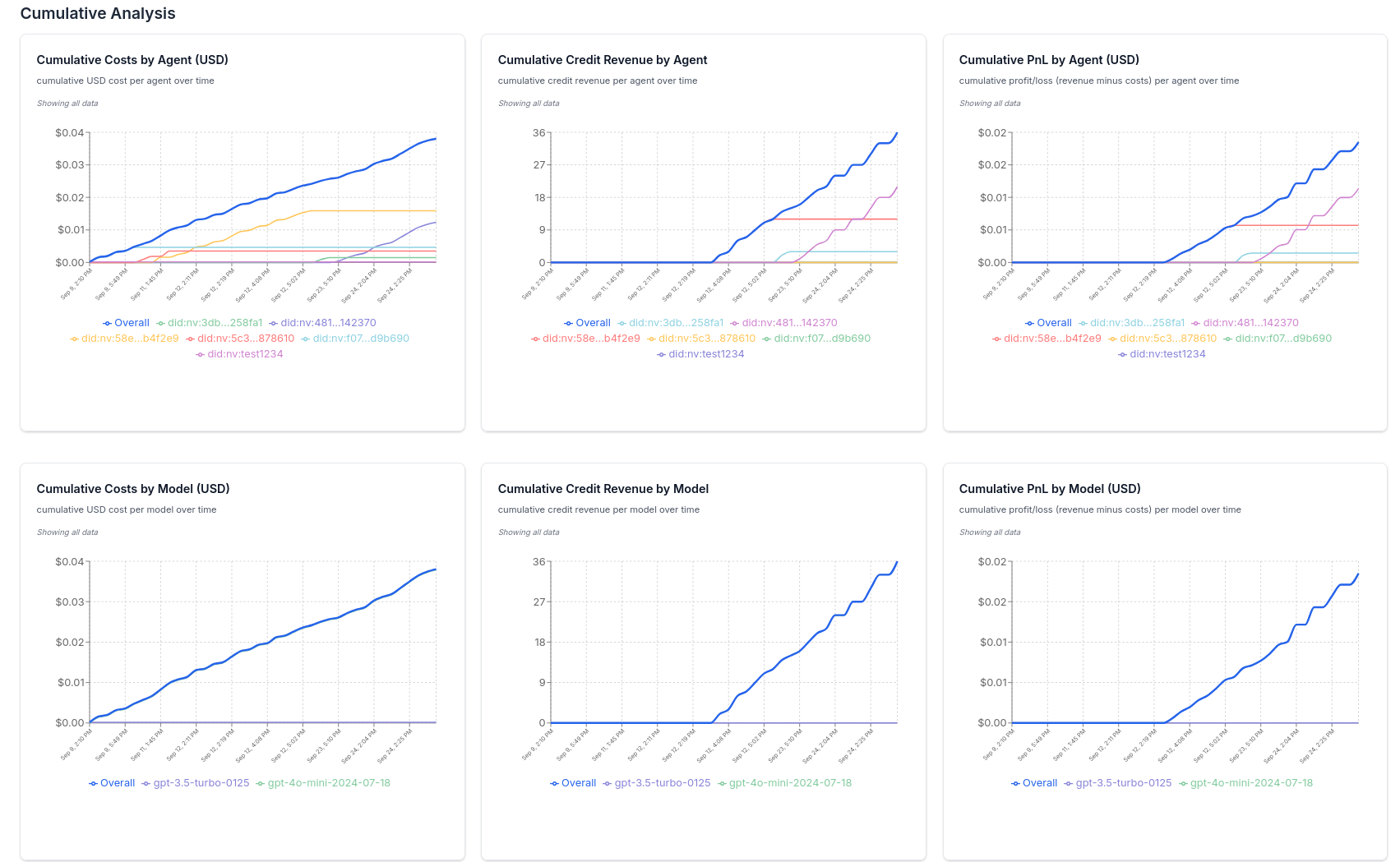 *Screenshot showing the Nevermined analytics dashboard cumulative analysis*
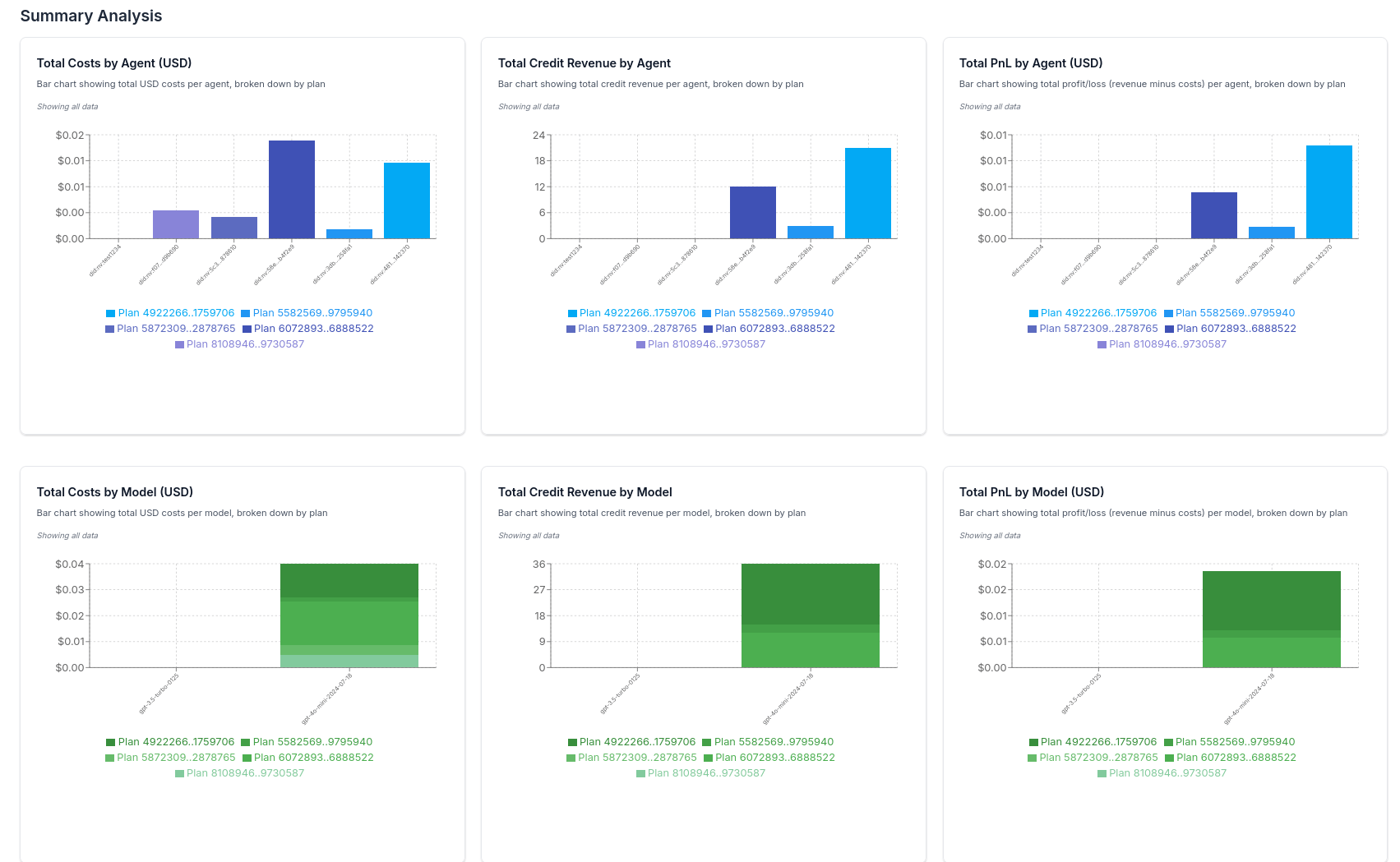 *Screenshot showing the Nevermined analytics dashboard summary analysis*
#### Key Metrics Tracked
The observability integration automatically tracks:
* **Per Request Analysis**: Cost, credit revenue, PnL, by agent, model, and more
* **Cumulative Analysis**: Cost, credit revenue, PnL, by agent, model, and more
* **Summary Analysis**: Cost, credit revenue, PnL, by agent, model, and more
### Filtering and Search
Use the built-in filtering capabilities to analyze specific patterns:
*Screenshot showing the Nevermined analytics dashboard summary analysis*
#### Key Metrics Tracked
The observability integration automatically tracks:
* **Per Request Analysis**: Cost, credit revenue, PnL, by agent, model, and more
* **Cumulative Analysis**: Cost, credit revenue, PnL, by agent, model, and more
* **Summary Analysis**: Cost, credit revenue, PnL, by agent, model, and more
### Filtering and Search
Use the built-in filtering capabilities to analyze specific patterns:
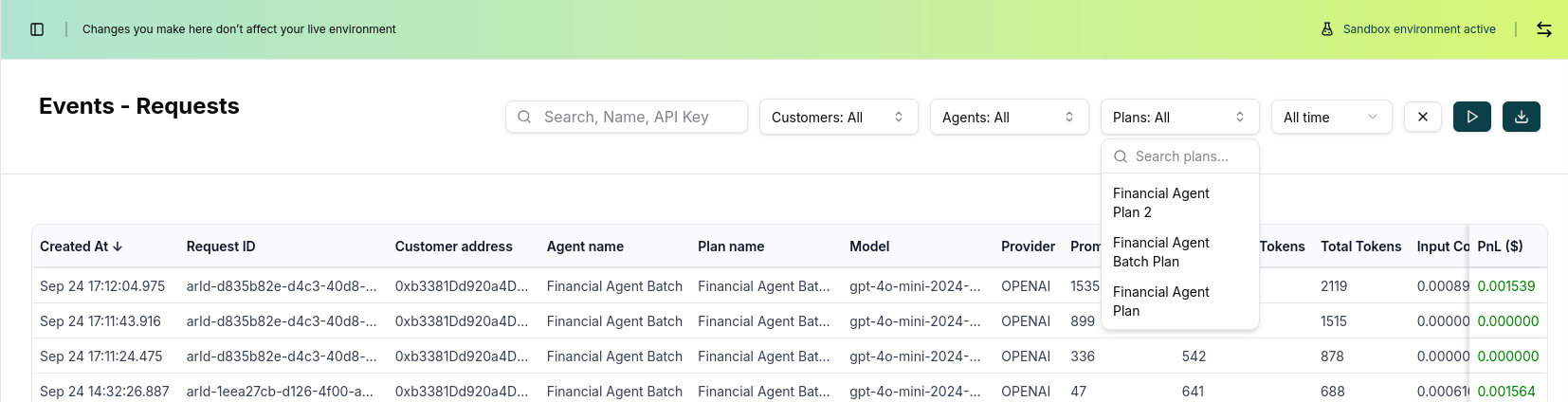 *Screenshot showing filtering options for date range, agent type, user, and more*
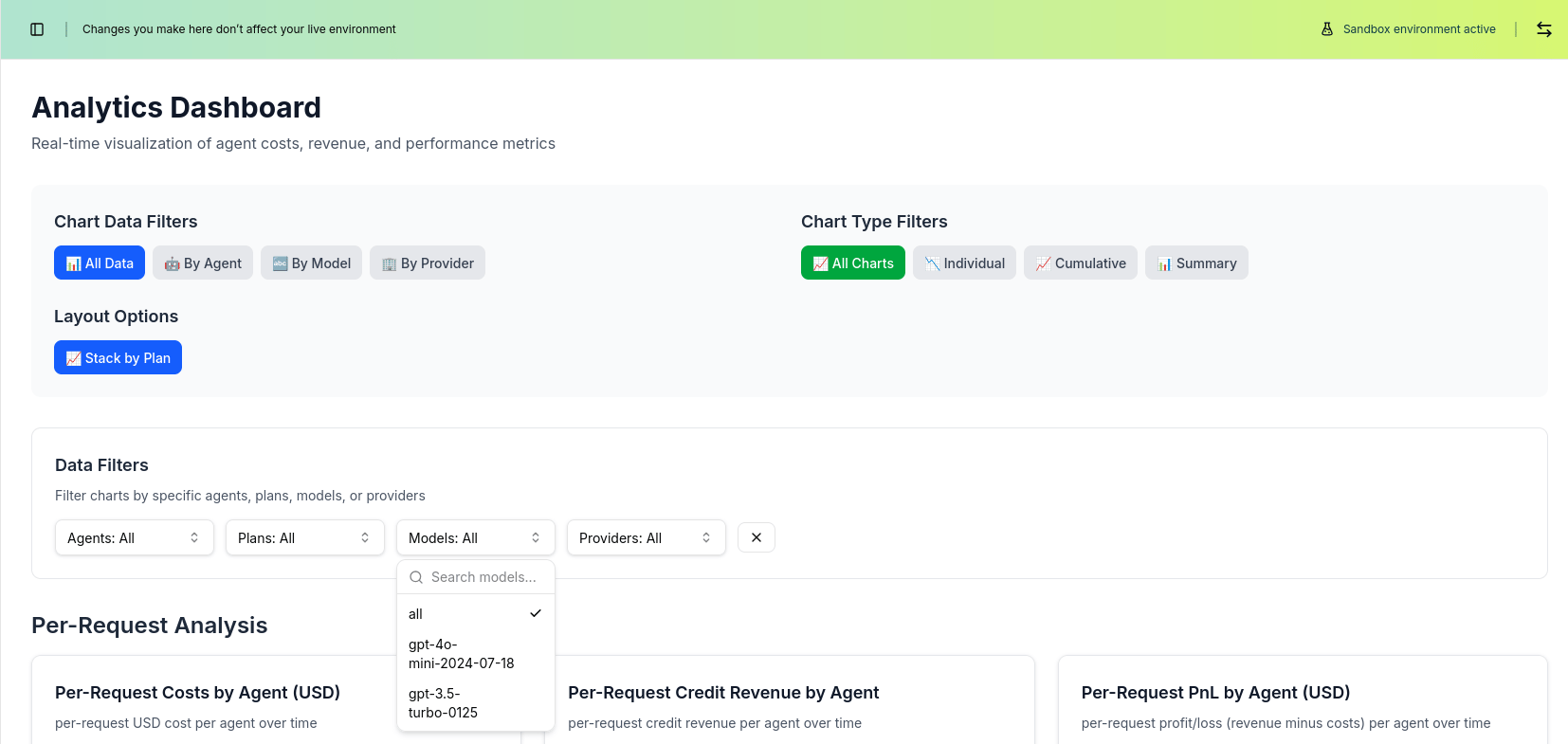 *Screenshot showing filtering options for agent, model, provider, and more*
## Next Steps
Learn how to handle and validate paid requests in your agents
Learn how to query AI agents programmatically
*Screenshot showing filtering options for agent, model, provider, and more*
## Next Steps
Learn how to handle and validate paid requests in your agents
Learn how to query AI agents programmatically